
Illegible Prints—Next Steps
If your criminal background check (CBC) results are returned “illegible," you need to request a new CBC through NMLS and have your fingerprints taken again. Follow these steps to authorize a subsequent criminal background check request after your first results have come back illegible.
About this task
Note: If fingerprints were taken on cards provided to the MLO by Fieldprint the MLO can
contact Fieldprint at 877-614-4361 to have the second set of prints
submitted.
Procedure
- Navigate to the NMLS Login page (Federal Context).
- Log in to your NMLS account.
-
Select the Federal context, if the
Context screen is displayed.
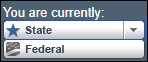
Note: Be sure you are in the Federal context by selecting Federal from the You are currently drop down list. Your screen should display the Federal Registry watermark.
- Select .
-
Select the Request New/Update button.
Note: If you do not see the Request New/Update button, you may already have a pending filing and will need to select the Edit button to continue editing your pending MU4 filing or the Delete button to delete the pending filing that is outstanding.
- Select the Criminal Background Check link on the left navigation panel.
-
Select I am requesting a Federal Criminal Background
Check.
Note: In order to become registered for the first time a Criminal Background Check authorization is required to be completed by all Federal Registrants. Also, any time an MLO changes federal employers, another CBC is authorization is required.
- Choose Submit New Prints.
- Review the Demographics for accuracy and click Save.
-
Once all information is entered, proceed to
Attest and Submit (the last section on the left).
A legal attestation appears.
-
Review the attestation statement, select the checkbox to verify your identity
and click the Submit button.
You will see the Filing Submission message indicating your submission is being processed.
Results
For further instructions regarding the criminal background check and fingerprinting process please contact your institution.