
Institution-initiated MU4R
If you are a mortgage loan originator (MLO) and your institution has initiated a MU4R Form on your behalf, but you will be paying the registration fee, you will need to log into your NMLS account, review the filing, submit your MU4R Form, and remit payment.
About this task
Upon receipt of an email from NMLS_Notifications@NMLSNotifications.com indicating that an MU4R Form has been created on your behalf, you need to login to NMLS to complete the filing.
Procedure
- Navigate to the NMLS Login page (Federal Context).
-
Log in to your NMLS account.
Note: If you are landed on the NMLS Connect screen, select NMLS Federal Registry in the Quick Links section.
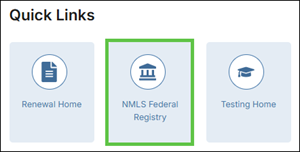
-
Select the Federal context, if the
Context screen is displayed.
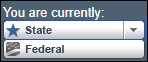
Note: Be sure you are in the Federal context by selecting Federal from the You are currently drop down list. Your screen should display the Federal Registry watermark.
- Select .
- Under To Create, Update, or Submit and MU4R on the MU4R Filing(s) screen, you should see a filing established with an Unsubmitted Status.
- Select Edit to open the MU4R Form.
- Review each section on the left navigation panel. If you find uncompleted sections or inaccuracies, make any necessary changes.
-
Select Attest and Submit on the left navigation
panel.
Once any and all outstanding items on this page are addressed a legal attestation will appear.
- Complete the attestation, then select the Submit Filing button to make your payment.
-
You must select I Agree to the terms and conditions and
select a payment method.
Acceptable forms of payment are Visa®, Mastercard®, and ACH.
Note: Using ACH is simple; all you need is your bank account number and bank’s routing number located on your check. NMLS will guide you through the rest.Once payment is submitted you will see the Filing Submission message indicating your submission is being processed.
What to do next
See Completing the Criminal Background Check Process to continue the Criminal Background Check process unless your employer has made other arrangements to have your fingerprints captured.