
Viewing the Status of Your Criminal Background Check
Follow these steps to check the status of an existing criminal background check (CBC) request.
About this task
Procedure
- Navigate to the NMLS Login page (Federal Context).
- Log in to your NMLS account.
-
Select the Federal context, if the
Context screen is displayed.
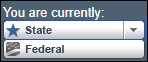
Note: Be sure you are in the Federal context by selecting Federal from the You are currently drop down list. Your screen should display the Federal Registry watermark.
- Select .
-
Select View Criminal Background Check Requests on the
left navigation panel.
From this page you can view the status of an existing request or click a link to schedule your fingerprint appointment if necessary. See the Fingerprint Status Reference Chart for explanations of status.