
Attesting to MU4 Filings Created by Sponsoring Company
Describes how to attest to Individual MU4 Filings created by a sponsoring company.
About this task
Procedure
- Navigate to the NMLS Login page (State Context).
-
Log in to your NMLS account.
Note: If you are landed on the NMLS Classic screen:
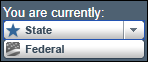
- Ensure you are in the State context by selecting State from
the You are currently drop down list.
- Select the NMLS Connect tab to manage your individual filing.
- Ensure you are in the State context by selecting State from
the You are currently drop down list.
-
Select the MU4 Filing link under My
Tasks.
Note: The status will be Attestation Requested.
- Review the filing for accuracy.
- Select the Attest and Submit link in the left navigation panel.
-
Review the errors and warnings in the Completeness Check
section.
Note: If there are any outstanding items, satisfy each item before attesting to the form.
- Select I verify that I am the named person above and agree to the language as stated.
- Select the Attest button.