
Attesting and Paying for Your Own Annual Renewal Requests
Individuals must attest to the accuracy of their information in NMLS as part of the license renewal process. This confirms their intent to renew licenses and ensures the renewal request is submitted to state agencies.
About this task
As part of the NMLS annual renewal process, individuals must complete an attestation step to confirm the accuracy of their record and their intent to renew one or more licenses. This step is required for the renewal request to be submitted to the relevant state agencies. The attestation window runs from November 1 through December 31 each year.
Procedure
- Navigate to the NMLS Login page (State Context).
-
Log in to your NMLS account.
Note: If you are landed on the NMLS Classic screen:
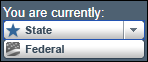
- Ensure you are in the State context by selecting State from
the You are currently drop down list.
- Select the NMLS Connect tab to manage your individual filing.
- Ensure you are in the State context by selecting State from
the You are currently drop down list.
-
Navigate to the Renewals Tab page in NMLS
Classic:
- Select Renewal Home in the Quick Links section.
- Select the Renew link next to the relevant license in the
My Licenses section.

The Renewals Tab in NMLS Classic is displayed. - Click the Attest and Pay button.
- Select the licenses that you are attesting to renewal for.
- Select the Next button.
-
If prompted, authorize any required criminal background checks or credit checks.
Note: See Completing the Criminal Background Check Process for more information.
- Select the Next button.
- Review invoice details and click the Proceed to Invoice button.
- Select I verify that I am the named person above and agree to the language as stated.
- Click the Attest and Pay Invoice button.
- Follow the payment prompts to complete the renewal attestation process.