
Example Two: One Yes Response, Two Events
An MLO has twice previously been named in financial services-related consumer-initiated civil litigation (Event 1 and Event 2). Both lawsuits were settled for some amount. In NMLS, the MLO would need to answer Question (F)(2), related to certain civil litigation, Yes. The MLO would complete a separate Disciplinary Action Explanation for each event as follows:
About this task
Complete these steps for Event 1 and Event 2. The supporting documentation for each explanation must be specific to that explanation. In this example, the MLO would not be allowed to merge documentation related to both lawsuits into a single Supporting File.
Procedure
- Navigate to the NMLS Login page (Federal Context).
-
Log in to your NMLS account.
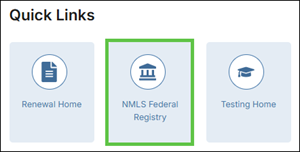
Note: If you are landed on the NMLS Connect screen, select NMLS Federal Registry in the Quick Links section.
-
Select the Federal context, if the
Context screen is displayed.
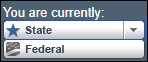
Note: Be sure you are in the Federal context by selecting Federal from the You are currently drop down list. Your screen should display the Federal Registry watermark.
- Click Add on Disciplinary Actions page.
-
Provide Brief Description of Disciplinary Action.
Important: Do not include personally identifiable information such as date of birth, social security number, residential address, personal telephone number or e-mail address.
- Provide Action Type.
- Provide Authority Type.
- Provide Date of Action.
- Optional: Provide Disciplinary Action Detail, if the MLO chooses to do so.
- Associate Applicable Question.
-
Select the Browse button and choose the supporting file
from your computer for the Event.
Important: Make sure that personally identifiable information such as date of birth, social security number, residential address, personal telephone number or e-mail address are redacted and/or not included in the uploaded documents.
- Select Save.
Results
What to do next
To Update or Delete an Action: An explanation may be updated or deleted by selecting the edit icon next to the Description. However, previously submitted versions of the Action will be viewable in Historical Filings even after the Action is updated or deleted.