Create a New Bond
How to use the Surety Bond Management screen in NMLS as a surety bond company to create bonds for licensees.
About this task
Instructions on executing and delivering a surety bond or a surety bond rider can be found at Surety Company Guide
Procedure
- Navigate to the NMLS Login page (State Context).
- Log in to your NMLS account.
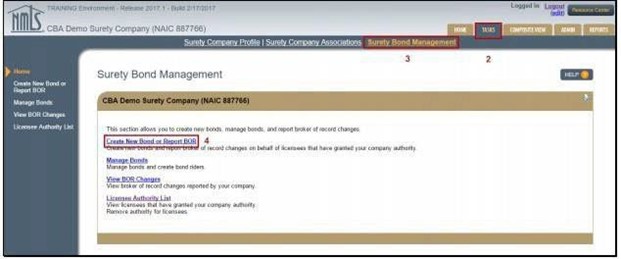
- Select the Tasks tab.
- Select Surety Bond Management.
-
Seelct Create New Bond or Report BOR.
This will display a list of all licensees who have granted you authority to create bonds on their behalf.
-
Select the Create Bond button next to the licensee you
will be creating a bond for.
-
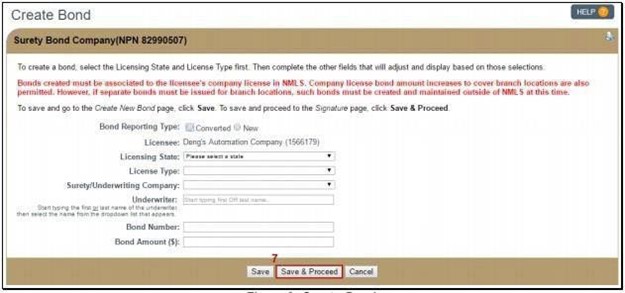
Provide the requested information.
Fields will automatically adjust based on requirements of the state and license type selected.
-
When creating a bond in NMLS to replace an existing paper bond previously
provided to the Regulator, known as a bond conversion, select the
Converted radio button and provide the existing
information.
Note: The effective date on the bond (if applicable) will be the date the bond is signed in NMLS by the surety entity.A surety bond producer identified by the surety company during the bond creation process will become eligible to act as broker of record on the bond after the bond has been signed by the licensee.
- A Not Formed in US option is available at the bottom of the drop down for electronic surety bonds requiring State of Formation for the licensee or surety company.
- Confirm that the correct license type has been selected.
- Click the Save & Proceed button.
-
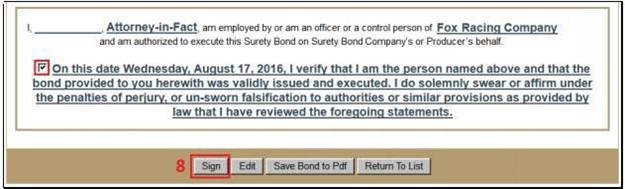
Reviewall information in the bond rendered. At the bottom of the page, check
the box to attest, then select the Sign button.