
Navigating Between State and Federal Contexts
NMLS allows individual MLOs to toggle between the “State” context for state licensing purposes and the “Federal” context for federal registration purposes. Follow the steps below to ensure you are logged in to the correct context of NMLS.
About this task
If you are unsure which context you should be in, please contact your employer.
Procedure
- Navigate to the NMLS Login page (Federal Context).
-
Log in to your NMLS account.
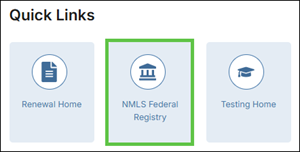
Note: If you are landed on the NMLS Connect screen, select NMLS Federal Registry in the Quick Links section.
-
Select the Federal context, if the
Context screen is displayed.
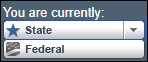
Note: Be sure you are in the Federal context by selecting Federal from the You are currently drop down list. Your screen should display the Federal Registry watermark.
What to do next
Note: This is a temporary fix to ensure you are in the correct
context of the system. If your computer automatically takes you to the incorrect
context, this is likely the result of a “cookie” from previous visits to NMLS. To
clear your browser cookies, see Log In Settings Incorrect?.